Mythweaver
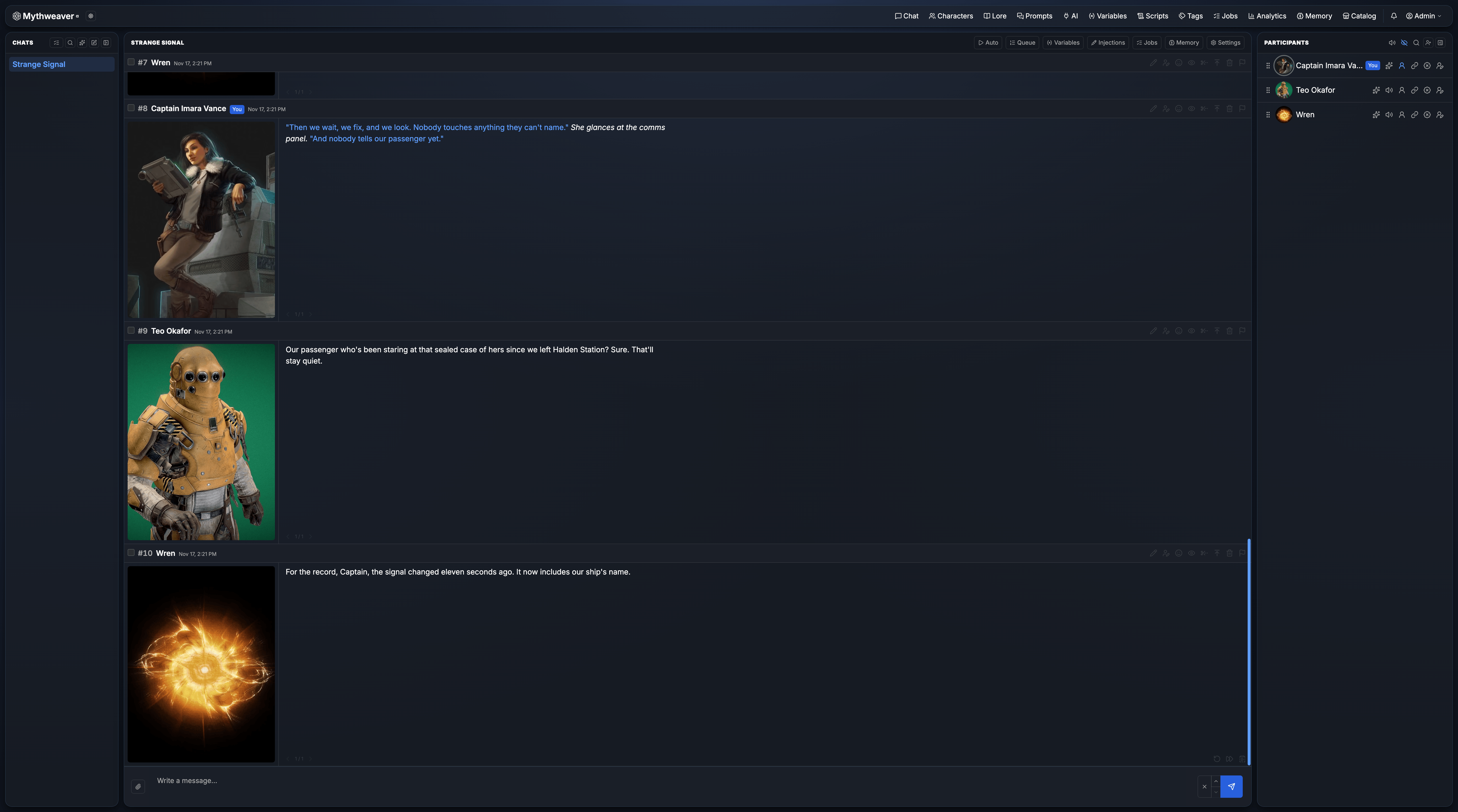
For the last several months, I’ve been working on an AI-powered RP tool, in the vein of SillyTavern, called Mythweaver. Mythweaver is my take on how an AI roleplaying tool should work. It’s somewhat opinionated, doing things differently than any other tool out there (although there’s a lot of overlap in this space).
There are a number of commercial solutions; Facebook has attempted to push some into things like Instagram, but most of the “serious” players in the space host their own, and a juggernaut in this space is SillyTavern. I started doing AI-based RP as a way to explore potential options for a way to do DnD when people are distributed across geographic areas. I’ve had a small DnD game ongoing, via text chat, with some friends for a few years now, and while we’ve had a lot of fun, the inherent limitations of the various platforms we’ve tried (Discord, Telegram, etc.) have forced us to come up with some conventions that are unergonomic, to say the least. A little more than a year ago, I started playing with some locally hosted AI models. I tried a few different frontends for talking to them, such as textgen-webui, before ultimately settling on SillyTavern. SillyTavern isn’t just an agentic chatbot; it’s a way to talk to “characters” that are powered by the AI. It isn’t the only one, but, to date, it’s been one of the best to use. You either find or create a character card 1, and then you can start chatting with it. A good AI model will keep track of the conversation and context, and the chats will be reasonably realistic and authentic. You are still talking with a computer, and so there’s a lot of hand-holding needed, but it’s a remarkably fun chat experience. Adding multiple characters to a single chat takes it from a 1:1 with a character to a much more dynamic group chat. You can have the characters play off each other, have disagreements, and more. It quickly becomes similar to a DnD game with a good DM. SillyTavern also has an extensive community, who have written all sorts of plugins, scripts, and more. These do everything from enable sounds when you get a new message to manage long-term chat “memories” (more on that later). However, not everything is perfect. My usage of ST quickly grew, and soon I had many group chats, with a myriad of characters, and long, detailed stories. I began using it less and less like a “conversation” with an AI or single character and more like an assisted novel writer, where I was the editor, and could poke and prod the AI to do what I wanted. Some of this was facilitaed by useful plugins such as Guided Generations, which lets you write instructions to the AI, and have it generate a response based on those guidelines. I always had a little bit of trouble with it, but it got the job done more often than not, and so I quickly went from being a “member” of the chat to being the editor/DM. I would still occasionally directly send a message as the character I was playing as, either to push the story in a particular direction, or if I couldn’t get a guided generation to do what I wanted. It changed how I approached a lot of it, quickly turning from a fun little game to what was essentially a superpowered “choose your own adventure” novel. As the context of my chat grew, I needed some better way to manage long term memories. SillyTavern will truncate your context, so the AI sees recent messages only. This is good, because you want fresh content in your prompt, but it makes the AI forgetful; something big and important that happened a few hundred turns ago is forgotten completely. Enter SillyTavern MemoryBooks, an impressive extension that periodically summarizes story events, and saves them to the “lore book” system built into SillyTavern. Lore books are a way of adding contextually relevant information to a chat session. They can be anything from instructions to the AI, character descriptions, events, and, in this case, memories. STMB takes your chat history, summarizes it into chunks, saves those chunks into individual lore book entries, and then periodically merges those entries down further, into arcs, chapters, and more. You lose fidelity of the past, yes, but that’s how real memory works as well. I added a variety of other extensions to change and augment the way ST worked, for features like character emotions (changing the avatar depending on the “mood” from a message), better editing experiences, utilities for building characters, and more. The problem is, SillyTavern is primarily a browser-based chat app. It does have a server, yes, but very little actual work is done on the server. And every extension I added does all of its work in the browser. With a few small extensions, this isn’t a big deal, but each one you add can slow things down. If you get used to the features an extension adds, removing it feels like giving up something important, and so you get stuck in a situation where the things that make the chat work the way you want to are also the things that make it frustrating. I have a reasonably powerful computer. SillyTavern could sometimes take up to 30 seconds for an initial load, mostly due to the number of extensions I used. I culled it down to a minimum set, but even then, it was very slow. As chat contexts, number of characters, and other factors grow, they can contribute to slowdowns as well. Long chat windows with many messages can slow things to a crawl, even though ST will attempt to unload old messages as time goes on. There are some issues intrinsic to the core of SillyTavern itself. Nothing that couldn’t be fixed, but development on ST has slowed down, and so a number of the new things are in various forks. One such fork is by AikoHanasaki, the author of STMB, called AikoBots. She has added a myriad of features, mostly built around the small chat community she runs. Her features do things such as enhance how memorybooks can tie in, which is logical given she wrote the STMB extension, but she also has added features that are useful to bot authors, such as being able to make their bots “read only”, hiding the internals of how they work, so people can chat with them, but can’t take them. Since ST runs in the browser, and does most of its work on the main thread (no service workers here), you are tied to that browser window. If you start an AI generation and then fat-finger close the window, your generation stops, and may even be lost, depending on how it was saved. I rarely lost messages, but I frequently accidentally closed a tab mid-generation, having to come back and use a “continue”2 to get my generation finished. And if you wanted to take your chat with you on your phone or tablet, forget about it. A base install of ST is snappy enough on mobile, but one that can bring a desktop browser to a crawl is impossible to use on mobile. And since generations are tied to the browser thread, if your mobile closes the tab, suspends it for memory use, or your signal fluctuates and you lose the connection, your generation can die. A very frustrating experience. I initially started Mythweaver as a way to play with Elixir and LiveView, to improve my knowledge in the internals of these systems. I use Elixir and LiveView at work, so I wanted a “playground” to experiment with new ideas and concepts, instead of trying to prove them on the programming that paid my bills. The very first versions were extremely rough, didn’t even really have much of a UI or the concepts of characters, but were built around the primitives I like from SillyTavern. Things evolved over time, as they always do, and that got us to version 0.1.0. From the beginning of the project, I asked Aiko what her pain points were with SillyTavern, and what she had managed to address with AikoBots. Eventually we hashed out a big wishlist of features a new chat system should have, and I got to work. The primary driving goal, for me, with Mythweaver, was to move as much work out of the browser as possible, so I could start a chat on my desktop, and continue it on my phone. LiveView is very good at this, since all the state lives on the server, and the client is essentially just a dumb UI. Follow on design goals were things like deeper lore book integration, some enhancements to the UI, and some major changes to some models ST uses. In SillyTavern, and many other AI chat apps, there’s an odd distinction between regular chats and “group” chats. I’m not sure why this is the state of things, but it is. There’s likely a good technical reason behind it, but that’s irrelevant. The distinction felt obnoxious and ultimately artificial. The SillyTavern UI does a good job papering over the complexities, and they’ve done a lot of work to ensure feature parity between the two, but there are still odd corner cases. In Mythweaver, I wanted chats to be far more dynamic. Add, remove, change characters, whatever. The chat should be flexible, so you can change it depending on what your story needs. And so, Mythweaver does not have a distinction between regular chats and “group” chats. All chats are group chats. Every chat has to have at least two characters, to talk to each other. You can play as either of them, or even both. In practice, the removal of the distinction isn’t something you’d notice, unless you are looking for it, coming from ST. The other significant change is the lack of a difference between “personas” and “characters” or “bots.” In SillyTavern, the human player has to play as a “participant” while the AI are always “characters.” I haven’t played around much with the multi-user plugins that attempt to make chats group chats, so they might fix this, but I found the issue somewhat obnoxious while using ST. Initially, I’d chat only as my character and let the AI bots respond however they were set up to. But as I developed my own pattern of usage, I found this limiting. I would use the impersonate commands to send messages as the various bots to drive the story forward, and always felt the UI was a bit clunky, even with plugins that prefill the input line with the appropriate slash command to send as said character. In Mythweaver, there is no distinction. Everyone in a chat, be they human, AI, or some other case (dolphin?), is a character. For RP, it becomes the human’s responsibility to stay in character; the AI usually does a pretty good job at this. Since the character you’re playing typically has full details in their character card, triggering and driving AI-written messages is trivial, and AI responses to things your character says factor in aspects of your character’s design, personality, and so forth. I’ve alluded to it a bit, but over the time I used SillyTavern, my usage changed from “play as a character” to more of an editor role. I would use guided generations to prompt the various characters to write messages, the AI would generate the messages, and I would edit, continue, and tweak as needed. But guided generations, evolving from a series of quick replies, was a bit clunky. It had some issues where even a good AI model would sometimes just ignore the instruction, treat the instruction like a continue, or other odd behavior. I never quite nailed down what was going on, but it was irritating. In Mythweaver, I wanted to make this mode of chatting extremely powerful. It’s not the default, if you type something in and hit the send button, your assigned character sends that as a message. But, if you type in a message and trigger one of the context-aware AI triggers (generate response as character, reword, continue, regenerate), the AI will receive your instructions as part of its prompt. Additionally, some other steps were taken to ensure that responses from the guided generation modes come back “useful”, avoiding things like the AI continuing to respond with generic instructions, when given generic instructions. The end result is that you are more or less in full control of what your characters are saying and doing, without having to put on many different RP hats. This one is a bit more complex, and possibly my biggest deviance from SillyTavern. SillyTavern has a powerful, yet slightly cumbersome, macro system, that makes use of the very same slash commands you would write in the chat to handle scripting. While using SillyTavern, I had macros for things like changing my character’s appearance, editing the “current” time/date, editing the “location”, and so forth. In Mythweaver, I did not implement slash commands. Instead, there are a few different templates a user can choose. The simplest is Liquid like templates, which are generally read only (although there are a few utilities for things like variables). They let you do things like inject random numbers, list chat members, etc. They cover a surprising amount of use cases, where one would previously have to use slash commands. SillyTavern has an analog, with its own interpolations, so the learning curve isn’t that high. The real “powerful” scripting system in Mythweaver uses Lua. Users can write Lua scripts that trigger on a variety of events, such as a new message, command palette trigger, quick reply toolbar button, etc. These scripts have access to a full context from where they are called, so things like rewriting a message based on regexp patterns or whatnot, which had to be done using a separate extension in SillyTavern, can be done using Lua scripts. The lua runtime implements most of 5.3 fairly well, so tools like MoonScript can be used to generate scripts for use in Mythweaver. I won’t pretend that this is a replacement for true extensibility; it isn’t. Mythweaver has no actual extensibility. Maybe in a later version I can figure out an extensions API. But as a replacement for macros? It’s excellent. One of my favorite extensions for SillyTavern is SillyTavern Character Creator. This powerful little extension lets you create and edit characters using a chat based interface, allowing the AI to refine the characters as you talk to it. With a reasonably good AI model, you can make very rich, token-efficient characters, quite easily. It’s particularly good when your characters, through the natural evolution of your story, introduce a new character. You feed it the recent context, some world information, and it generates rich character cards. Unfortunately, it was somewhat cumbersome to use. You have to step through a few form fields to get to the actual chat UI, and it does have some limitations on how well it worked. I started trying to make a similar feature for Mythweaver, but with a more simple UI. At the same time, one of my testers was mentioning how it was somewhat difficult to figure out how to set everything up for things like the AI models, chats, lore books, etc. The two ideas merged, and assistant chat was born. In mythweaver, you can start an “assistant” chat. This mode is more akin to talking directly to ChatGPT or similar, with a familiar text box and chat balloon UI. There are no characters here. You can tell the assistant that you want to create a new character based on the last 10 messages in such and such chat, and it will look those messages up, and start to build the character card. Every step of the way, it interviews you about the character, and you can talk to it to iterate on the design. Once you’re finished, it can create the character, and even add them to your chat. It can do other things as well, like configuring your lore books, creating new chats, set up AI models and more. And if you don’t like doing it in Mythweaver, the natural extension of this feature was an MCP server. So you can use an external AI agent to interact with Mythweaver, setting things up for you. Useful if you have an expensive Claude subscription, and don’t want to use it for chat. In Mythweaver, everything is built to be quickly made multi-user. The default install is designed for a single person to use on their own computer, but you can very easily switch it to a multi-user setup. In a multi-user system, the site can establish its own lore books, AI providers, models, characters, and more. These are available to every user, and can simplify setup for small groups, particularly where technical ability varies. Multi-user mythweaver can be set up so that the admin sets up all the AI models and you just chat with characters, or it can be made fully BYOK, cutting administrative costs. Users can publish characters, cards, lore books, and more to each other, sharing them with friends, or even publish them to an internal catalog, so any other user can chat with their creations. Bot creators will be happy to see that they can lock down their creations so that exfiltrating bots, while not impossible, has no easy route available to most users. Finally, all chats can be made multi-user group chats. A chat owner can invite other users to join their chat, assign them one or more characters to play as, and chat with each other in real-time, like your favorite messenger app. Mythweaver is built atop Phoenix LiveView. It has minimal frontend dependencies, can be deployed anywhere you can deploy a docker image, and instructions for docker-compose deployment locally are readily available.. Its backend is a bit more complex than SillyTavern’s, encouraging use of an image proxy server (xtandard-image), for real-time image resizing and optimization, an nginx reverse proxy (again, tied to the image optimization), and a postgres database with pg_vec enabled (for the vectorized search model for Lore entries). Still, running it via docker compose can typically be done with a single command, and efforts have been made to optimize this. CPU wise it’s fairly lightweight, capable of entertaining several users on a single laptop. Many generations can occur simultaneously; the backend doesn’t block waiting for responses from AI providers. Deploying a “real” production instance of Mythweaver was designed to be fairly easy as well, with support for things like S3, Fastly, Cloudflare, other CDNs, image optimization flows, and more. Deploying a Mythweaver setup to something like Fly.io is nearly as easy as deploying via the docker compose setup, and can quickly get a multi-user setup for a group up and running. Currently, there is no way to set up open registration; an admin must create accounts for users. The MCP interface can augment this, allowing integration, and I’m thinking about how to set up the other parts of registration, including things like SSO. Feel free to open a discussion, mention it in Discord or issue if you have ideas in this area. Phoenix LiveView really shines here, as it allows for a tremendous amount of interactivity, and dramatically simplifies the modeling and setup of the backend. Where SillyTavern and others have the difficult problem of “how do you wait for a slow AI model to respond”, Mythweaver is perfectly happy to make its request, and then go do other things while it gets a response back. If you’ve never done anything with Phoenix LiveView, I highly encourage it. I’ve been writing elixir for about 10 years now, and it’s still my favorite languate. Give Mythweaver a spin! Install it, get a friend to install it, or whatever else. Drop by and chat with us, or open a discussion or issue Awesome thanks to everyone who helped me test and develop this over the last several months. Couldn’t have done it without you!SillyTavern
My usage
The problems
Enter Mythweaver
All chats are group chats
No Participants, everything is a Character
Full on “editor” mode
Scripting
MCPs and Assistant mode
True multi-user
Architecture of Mythweaver
Conclusion