DIY open-source whole-home audio
My home was built in the mid 90s, and was fairly technologically advanced, for the time. It had a burglar alarm, intercom system, central vac, and more. I’ve already blogged about the burglar alarm, and tying it into HomeAssistant. This post mostly concerns the intercom system, or rather, the remnants of it. Like many homes built between the 70s and the 90s, there are remnants of an intercom system. The doorbell that came with the house, an amplifier in the utility closet, speakers in each room, and blank wall plates where the intercom units used to be. Over time, various parts of the intercom were dismantled, leaving mostly just the speakers in each room. Previous owners kept the speakers working, despite the missing intercom control panels, by tying multiple speaker circuits together, and plugging them into the amp, which had a simple RCA input, which could be connected to a PC or something like a Chromecast Audio (RIP). When I purchased the house, we connected a Chromecast Audio to the audio input on the single, 90s era amplifier, and things mostly worked. You didn’t get zone level control, but when it was just my wife and I, we didn’t really care; audio played to the whole house was fine. This amplifier also powered the doorbell, which was rather neat, as you’d get a soft electronic chime in every room of the house. Unfortunately, the amplifier was starting to wear out, showing its age. During winter, when the furnace would run, the utility room would get rather warm, around 80°F (27°C), and the amp would start to cut out, or produce an electronic buzzing noise. It would typically choose to do this at the most inopportune times, like 3AM on a Monday. And since the doorbell was part of the amp, we’d miss rings. So the first thing to get replaced was the doorbell. I pulled Ethernet to the front door, and installed a Ubiquiti doorbell. This was an adequate replacement for the doorbell, but did nothing to fix the sound system. Things stayed this way for a few years, but fixing up the audio was always a project that lingered at the back of my mind. Setting up whole-home audio isn’t a terribly complicated task, at least on the surface. You need speakers in every room; I had that already. Assuming you want multi-zone control, I did, you need to then get either an amplifier, or amplifiers, that are capable of multi-channel audio. Typically these are called matrix amplifiers, and are described in An alternative option is to drive each zone with its own amp and controller. Since I was only driving single speakers in most zones (a few zones have 2 speakers), a simple Class D amplifier is more than enough. Simple amps can be had for around $20. Once you have something like this setup, synchronizing audio across multiple zones becomes a software and network challenge. The multi-zone amps will typically take care of things for you in this regard. Finally, you need a source of the audio. Some way to actually play music into these amplifiers. A Chromecast audio is one such example, and many systems have their own ‘audio sources’ that can be used. Some even have them paired up with an amp. For my usage, I had a few hard requirements: I want to avoid being tied to any proprietary ecosystems. I’ve been burned by that too many times in the past, and so I wanted something that was, at the very least, able to be fully controlled via local protocols. Ideally, it would integrate well with HomeAssistant and MusicAssistant I want to be able to play different audio to any combination of rooms at any time. Each room should be its own zone. I wanted to keep the cost reasonable. Audio products can just balloon in pricing, and if I was realistically going to get things done, I had to pinch every penny. I wasn’t driving ultra-high-end speakers, so I didn’t need ultra-high-end amps. This is something my wife, and in the future, my kids are going to want to use, and so it can’t be absurdly nerdy in its operation. Being able to “just cast spotify” to a room isn’t a hard requirement, but it’s a big plus There are a number of ‘ecosystems’ out there, that satisfy all or most of these requirements. The “big name” in this space. Sonos was one I looked at early on, and got somewhat spooked by their price. They tend to focus exclusively on speakers, although they do have an “amp” offering. But recently, they’ve been aggressively proprietary, and have been known to brick older devices. This is a big no-no for me, and so I quickly crossed them off the list. Couldn’t afford them to begin with, and so I didn’t look too far into them. Checked all my boxes, more or less, and with MusicAssistant providing a control plane, seemed like a good fit. But the cost did start to add up, and the RPi shortage of a few years past kept pushing the project further and further out. I may still wind up using some Pis in the future. This came highly recommended by some associates, and I looked into it. You have to use their app to manage the system, but once that’s done you can control it nicely from HomeAssistant, MusicAssistant, and similar. The amps are decently priced, and the system is modular. However, much like the Sonos one, they’re generally built for ‘point of control’, where the amp/streamer is close to the speakers. With my centralized layout, I’d have had a rack full of remote devices. Not terrible, but I’ve always learned that when you’re at the periphery of a product’s supported use case, things get complicated These are open-source boards, that run open-source software. Each one is a Class-D amp and an ESP32, with supporting circuitry. Able to pump out up to 25W per channel, they were pretty close to perfect for me. The Louder-Esparagus is a nice, neatly packaged board, that looks good next to a pair of bookshelf speakers or similar, and the Louder-ESP32 is roughly the same form-factor as an RPi, which makes it very easy to mount. Ultimately, this is what I wound up going with The main livingroom of the house is not tied into the rest of the house’s audio system. Instead, on one wall, there’s a plate with a mess of speaker wire hanging out of it. For the 4 visible speakers in the room, there were 10 pairs of wires. Breaking out a wire follower, I quickly identified the pairs that drive the 4 speakers in the room. I don’t want to put a TV in this room, as there are 3 massive windows that look out on the mountains, and so I didn’t care quite so much about quadraphonic sound, so doubling up speakers into stereo was fine. For this room, I purchased a Louder-Esparagus. Setup was fairly quick and simple; I just flashed it with ESPHome, and had audio playing out of it in under half an hour. I designed and printed a bracket, to get the little box up off the floor, and, when hidden behind a sideboard, it looks and works rather well. Satisfied with how well the Louder-Esparagus was working, I purchased a bunch of Louder-ESP32. These are little credit-card size boards, about the size of a Raspberry Pi. It’s got the same “stuff” as the Louder-Esparagus, but since it’s caseless, it’s a bit cheaper. Being caseless is a perk for me, as I designed and printed a DIN Rail mounting case for it, so I could mount it on a rail in the utility closet. Flashing it was, at first, a bit trickier than I anticipated. I had some trouble at first, the board ignored my serial connections, but upon closely reading the instructions, I found the button combo you need to hit to get the device to enter boot mode, and got it flashed. There are a number of firmware variants available for these little boards. You can make them run a Squeezelite interface, which is an open-source version of the old Logitech Media Server system. It works rather well, and allows each player to not only connect to something like MusicAssistant, but also to act as a bluetooth and airplay target. The ‘newest’ system for controlling these is a protocol that’s come out of the MusicAssistant project, called SendSpin. As of May 2026, the time of writing, ESPHome has gained native Sendspin components, so this was the natural choice for me. The Louder-ESP32 has sendspin compatible firmware configurations. I copied over that firmware to my HomeAssistant config, and then edited it for my system. You can view my config files here. Note that these are used as a template for each individual device, to reduce duplication. An individual device config looks like this. ESPHome does have ways of making a ‘generic’ template, that you flash repeatedly to each device, that then allows the user to provision and set it up, aimed at custom device makers, like Apollo Automation, but I didn’t go with that for this use case. Probably should have, in retrospect. I created a new ESPHome device for each board, used templates to fill it in, and then compiled and downloaded the Once I had the boards flashed, and labeled with my label maker, I went into my utility room, and mounted them on the DIN rails I’d installed earlier. My din case made this a snap, quite literally, and soon I had each mounted. Power came from a MeanWell EDR-120-12 DIN-rail mount PSU, and was distributed among a few boards via a terminal block I found on Amazon as well. Wiring the existing speakers into the boards was also done using a terminal block, of sorts. I found a wago connector DIN rail mount that prints super quickly, and since I already have buckets of Wagos lying around, proved to be the cheapest option. Printing these out, and snapping a wago into them, took less than an hour. Then it was just a matter of running the existing speaker wire into one side of the wago, and making a small jumper to connect them to the Louder-ESP32s. Most of my rooms are mono, and so I only had to wire one leg of the speakers up. Louder-ESP32s allow you to bond the left and right channel together, but I ultimately didn’t do this, because one channel was more than loud enough for the speakers. Once everything was wired up properly, I turned on the PSUs, and very little happened. The boards turned on their status LEDs, yes, but that was it. Once these are set up in ESPHome, and show up in your HomeAssistant config, you need to open up your instance of MusicAssistant, and set them up. I won’t go into the install instructions for MusicAssistant, but it’s not much if you’re already running HomeAssistant. In MusicAssistant, you need to go to your player providers, and enable Sendspin as a provider. And that’s basically it. Once you have Sendspin set up, it should auto-discover the various media players we just set up. For me, it took about a minute, and they all showed up. And then, you can just select them and play music to them. I started off playing a bit of music to the kitchen, and it just worked. I then used the controls to create an impromptu group, and added the living room, and a number of other speakers on the same floor. They popped into playback and synced, perfectly, with the kitchen speaker. No matter where I moved through the house, they all sounded good, in sync.Remnants of the Intercom System
Options
input x output configs. An 8x8 amplifier has 8 separate input channels and 8 separate output channels, so you can have up to 8 audio sources, and send them to any combination of those 8 zones. There are a variety of options in this space, ranging from a few hundred dollars ($400-500-ish) all the way up to tens of thousands.Getting up and running
Livingroom
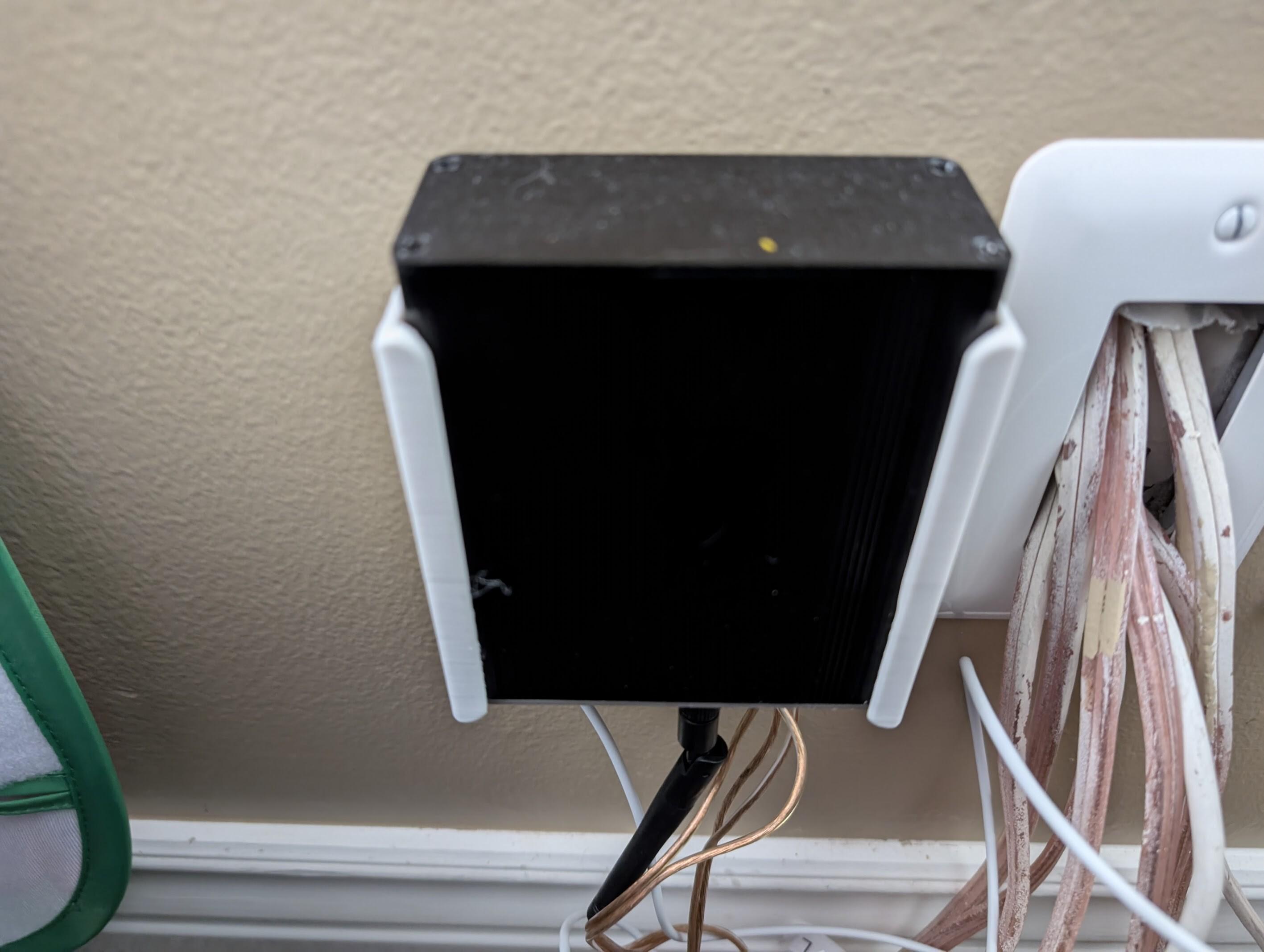 The wall-mount bracket keeps it secure and out of sight.
Whole-home
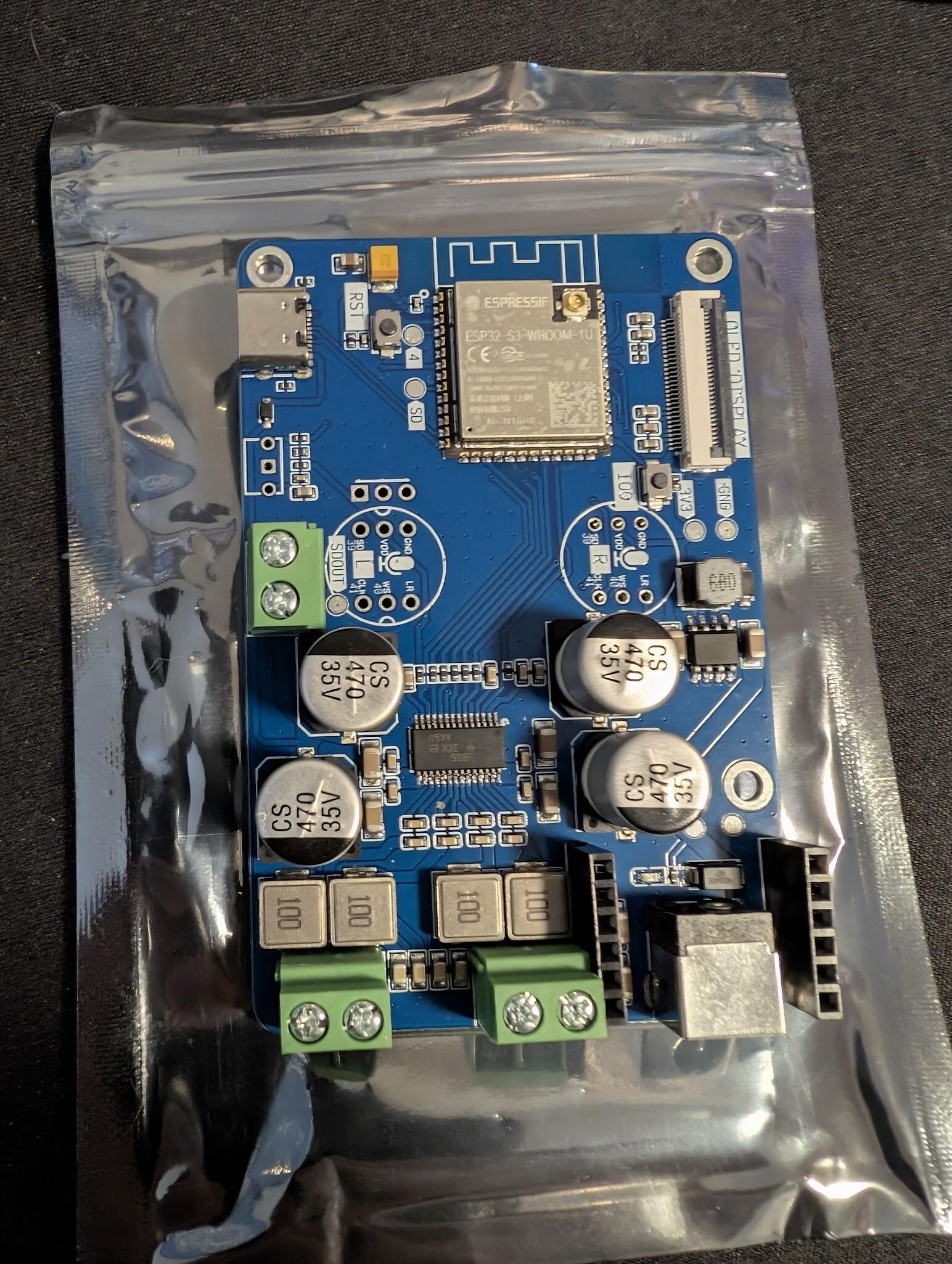 A louder-ESP32
bin files, and flashed them using esptool. Each board took about 5 minutes, beginning to end.Installation
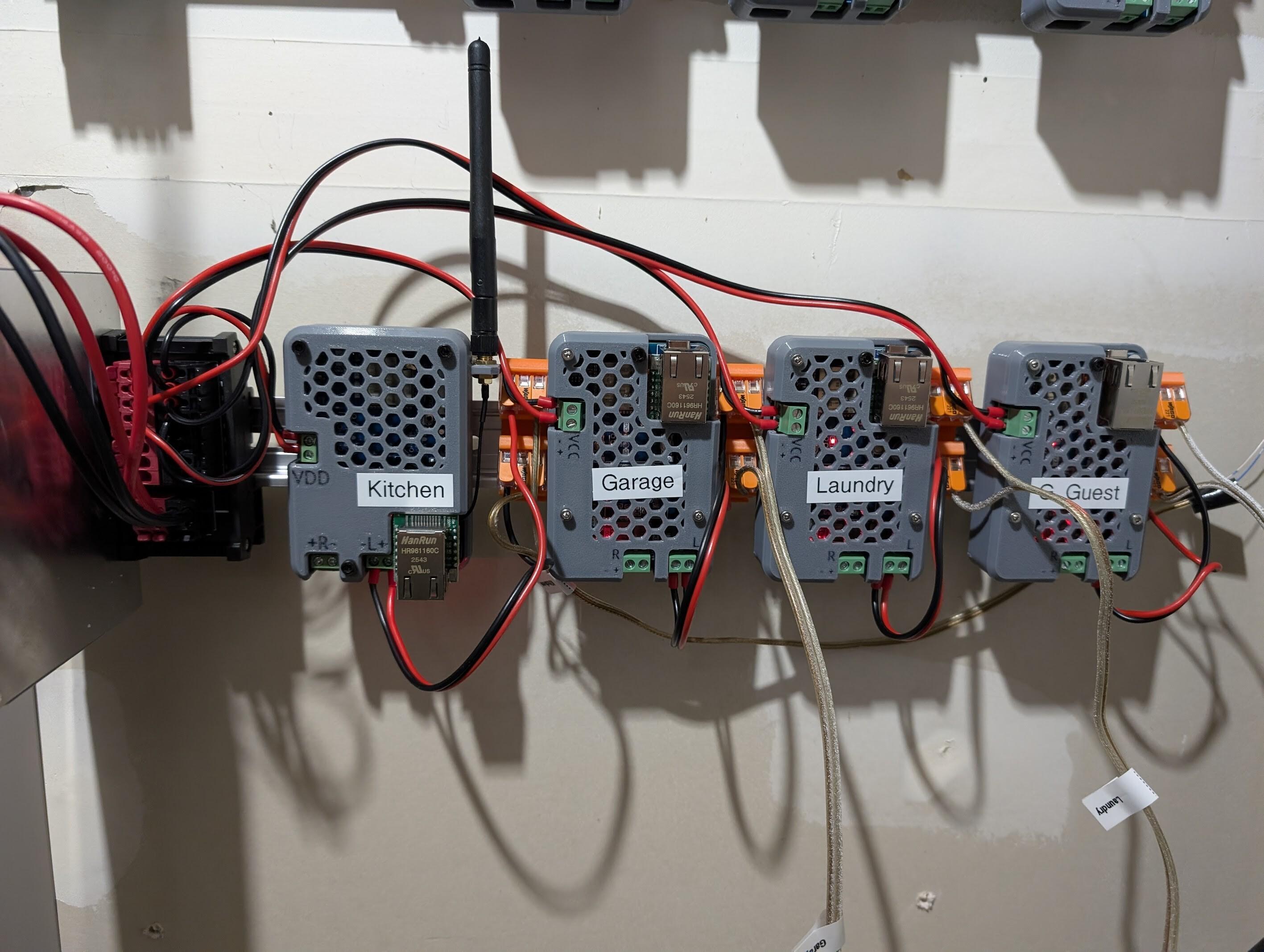 Some of the speakers wired up. The wiring is a bit of a mess, I’m still waiting for some panduit to arrive.
MusicAssistant and software